Frame it like a photographer.
16-9 turns the SketchUp camera into an architectural photography viewfinder. Pick a format, compose against real guides, keep your verticals straight — then export exactly what you framed, at any resolution.
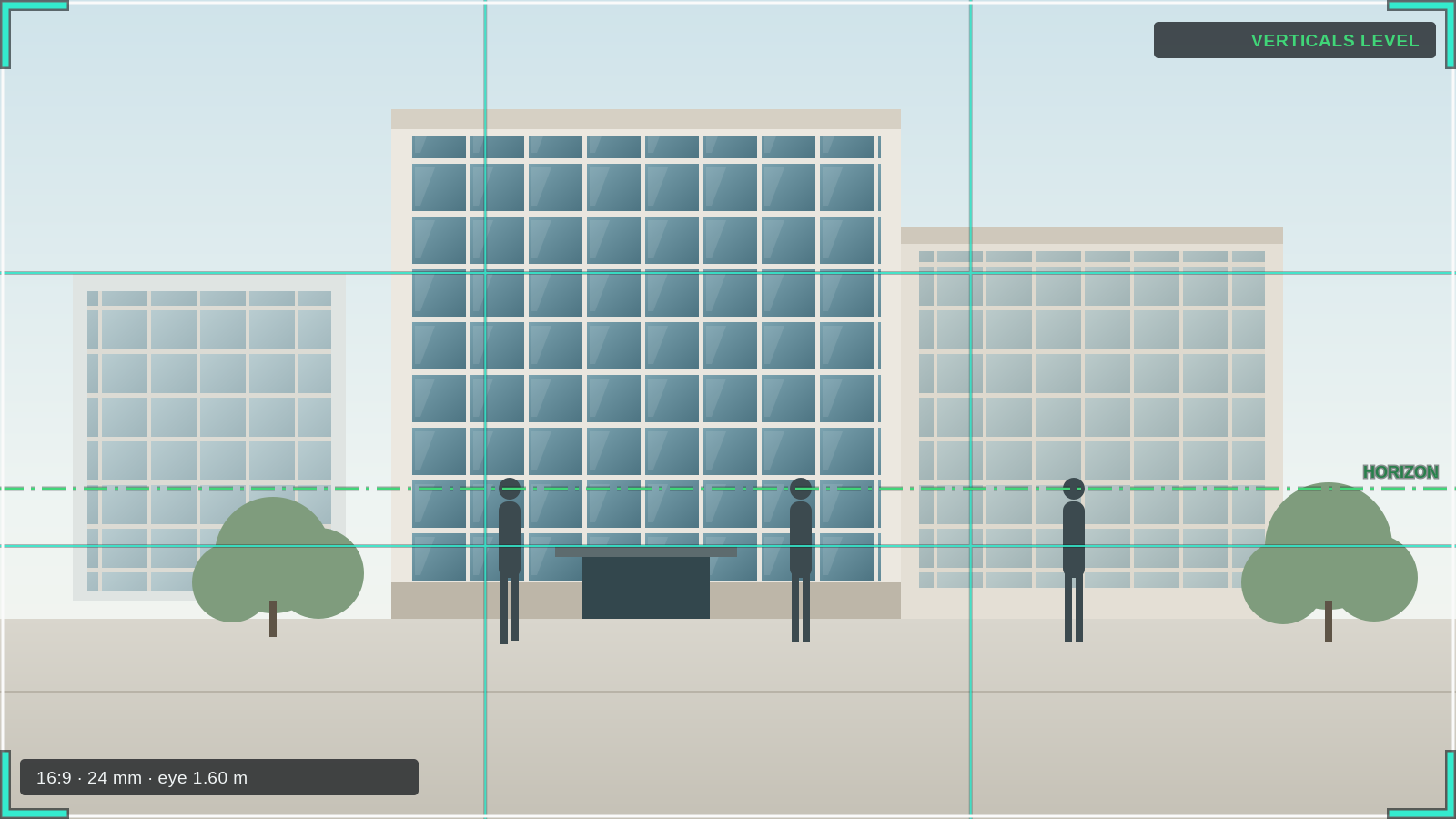
What you see in SketchUp: the frame, thirds, the horizon at eye height, and a live read-out of format, focal length and tilt.
Three steps to a better view.
16-9 only frames and reads your camera. It never edits geometry, never writes into your model.
Pick a format
16:9 for screens, 3:2 like a camera, 4:3, square, ISO paper (√2) for boards, or cinema 2.39:1. Landscape or portrait, or your own ratio. SketchUp mattes everything outside.
Compose and level
Thirds, golden section, diagonals, a grid you size. The horizon sits at eye height; one click levels the camera so verticals stop converging. Set 24 mm or a 1.60 m eye height by typing it.
Export exactly that
PNG or JPG from HD to 8K, or sized for A4–A0 paper at your DPI. The image is always the exact ratio you framed — for one view or every scene in one go.
Nine formats, both ways round.
Every format works in landscape and portrait. Or type your own ratio.
Everything in the box.
One toolbar, one panel. Every command is also in the menu, so you can give it a shortcut.
Composition guides
Rule of thirds, golden section, diagonals, centre cross, a grid from 2 to 24 divisions, title- and action-safe areas. Pick the colour and opacity; a shadow keeps them readable on white.
Eye-level horizon
A line where the horizon really is — through the eyes of anyone standing at your camera height. Green when the camera is level, amber when it tilts.
Straight verticals
The read-out shows the camera tilt to a tenth of a degree. One click levels it — the architectural photographer's rule — without moving your eye point.
Focal length you know
SketchUp's field of view as a 35 mm-equivalent focal length. Set 17, 24 or 45 mm with one click — the values tilt-shift lenses use.
Eye height by number
Type 160 cm or 1.2 m (seated). Eye and target move together, so the view keeps its direction and only the height changes.
Pixel-exact export
PNG with transparent background or JPG with quality control, HD to 16 000 px. A4–A0 at 150–300 dpi in one click. Never stretched, guides never baked in.
Every scene in one go
Render all scenes at the same format and size, named after each scene. A progress bar, a Cancel button, and your current view restored afterwards.
Holds the frame through scenes
A scene saved without a ratio would normally drop the frame. 16-9 puts it back as soon as the scene settles — and steps aside if something else keeps fighting it.
Your model stays yours
Nothing is written into the file. The frame ratio is SketchUp's own camera setting, so a colleague without 16-9 opens your scenes exactly as you framed them.
The panel, live.
This is the actual 16-9 panel running in your browser. Click through the formats, guides, camera and export tabs.
A demo with sample data — in SketchUp the panel drives your own camera.
One office, five seats, any number of computers.
A floating licence counts people using 16-9 right now, not installations. Install it on every desk; five work at once.
A seat is held only while 16-9 is in use and returns by itself when the frame is off, the panel is closed or SketchUp quits. When all seats are busy, the panel lists who has them and lets you take one over.
Get 16-9
Start with the trial. It is the whole product for three days — no card, no form.
Trial
- The whole product, not a preview.
- No card, no sign-up form.
- Once per computer.
Standard
- One person, one SketchUp at a time.
- Install on your own computers; move the seat with one click.
- 8 hours offline after the last check-in.
- Every update while you subscribe. Cancel anytime.
Floating
- Five people at once; add seats at $20 each.
- Install on every computer in the office.
- One licence code for the whole team.
- See who holds a seat; free one in a click.
Questions people ask first
Which SketchUp versions are supported?
SketchUp 2023 and newer. The guides are drawn with SketchUp's overlay system, which arrived in 2023.
Does it change my model?
No. 16-9 never edits geometry and never writes data into your file. The frame ratio is SketchUp's own camera setting, saved with your scenes like any other camera setting.
What happens to my scenes if the licence ends?
Nothing. 16-9 simply stops drawing its guides and asks for a licence when you use it. It does not reset your camera or touch your scenes — they open exactly as framed, with or without 16-9 installed, on your computer or a colleague's.
How does the floating licence work?
It counts people using 16-9 at the same time. Five seats means five computers at once; install it on as many as you like. A seat is taken when 16-9 is in use and given back when it is idle or SketchUp closes. If every seat is busy, the panel shows who has them and lets you take one.
On how many computers can I use a Standard licence?
Install it on your computers; one SketchUp may hold the licence at a time. Starting 16-9 on another machine offers to move the seat there. The licence code is your account — enter it once on each machine.
Does it work without an internet connection?
For 8 hours after the last successful check-in. Then it asks you to connect once; your models are not affected.
Can I get a refund?
Fourteen days, no reason needed — write to us and we refund the charge in full. There is also the free trial, so you can find out before paying anything. See refunds & cancellation.
How do I cancel?
Open the subscription-management link at the bottom of any receipt Paddle sent you, or write to us and we will do it. You keep access to the end of the period you have paid for.